---
title: "Data during my PhD: dmenu helpers"
author: Bob Rubbens
publish_timestamp: 2025-12-04T09:07:52+01:00
state: published
template: template/post.mako
id: fc4d991a-a772-4a5a-bc06-18865b3ba518
---
[dmenu](https://tools.suckless.org/dmenu/) is a tool for showing a dynamic menu at the top of your screen from the command line. You feed it some options over `stdin`, separated by newlines, which it then lists:

You can then type which option you want, and dmenu will try to match your input to the closest option. When your press enter, it will print the chosen option to `stdout`. A classic example of [the unix philosophy](https://en.wikipedia.org/wiki/Unix_philosophy).
As a standalone program, it's not directly useful. However, as a reusable component it can make any automation task more interactive, without having to pull in a boatload of dependencies. dmenu is small, generally available via most package managers, and in a pinch easy to compile yourself.
I'm always looking for oppurtinities to use dmenu. I don't write that many automation scripts, but there are two particular tasks in my PhD folder that I'm using dmenu for frequently. These are scripts for opening PDFs from my bibliography and for looking up latex documentation.
# Bibliography script
I've set up a keybinding to show me a bibliography listing using dmenu when I press Super+0:
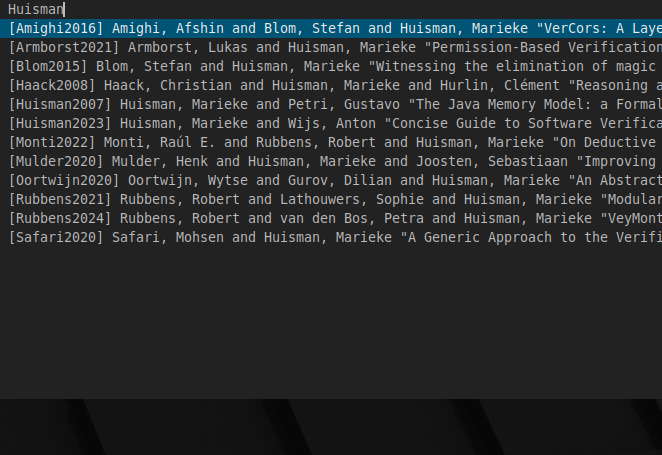
The script [`dmenu-pubs.sh`](./dmenu-pubs.sh.html) first gets a list of entries from [pubs](https://github.com/pubs/pubs) and then gives them to dmenu for display. When dmenu prints which entry the user selected, I extract the citation key with a regular expression and instruct pubs to open that PDF. Short and simple! Any time I read a document for more than five minutes, I usually put it in my pubs database. With the `pubs_dmenu.sh` script it's easy for me to re-open the PDF when I want to reference it later on.
# LaTeX docs script
This script [`dmenu-texdoc.sh`](./dmenu-texdoc.sh.html) is still a bit incomplete, but it's already helpful. Essentially I'm using dmenu to allow typing in a package name. I then pass this to `texdoc` to open the documentation related to the user input:
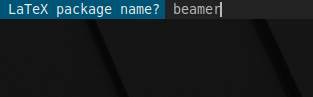
I've got this bound to the Super+t key combination. I use it all the time when writing articles and presentations in LaTeX.
The script is not very precise; sometimes it opens a different piece of documentation than I was expecting. In the future I'd like to extend the script to list all available packages, and to allow the user to choose if they want the fuzzy matching done by texdoc, or open the documentation of a given package name (and fail if that package does not exist).